Logo Files Explained: What Formats You Need and Why They Matter
Once your logo is finished, your designer sends a folder of files with names like AI, SVG, EPS, PNG and PDF. Knowing which logo file formats you need, and when to use each, saves you from blurry prints, broken websites and repeat requests to your designer. This guide explains each format in plain English and tells you which one to use for what.
Format
Type
Best for
AI
Vector
Master file, future edits
EPS
Vector
Print vendors, older software
SVG
Vector
Websites and apps
PDF
Vector or mixed
Sharing, proofs, print
PNG
Raster
Web, slides, transparent background
JPG
Raster
Photos, email, simple use
Vector vs raster: the one idea to understand
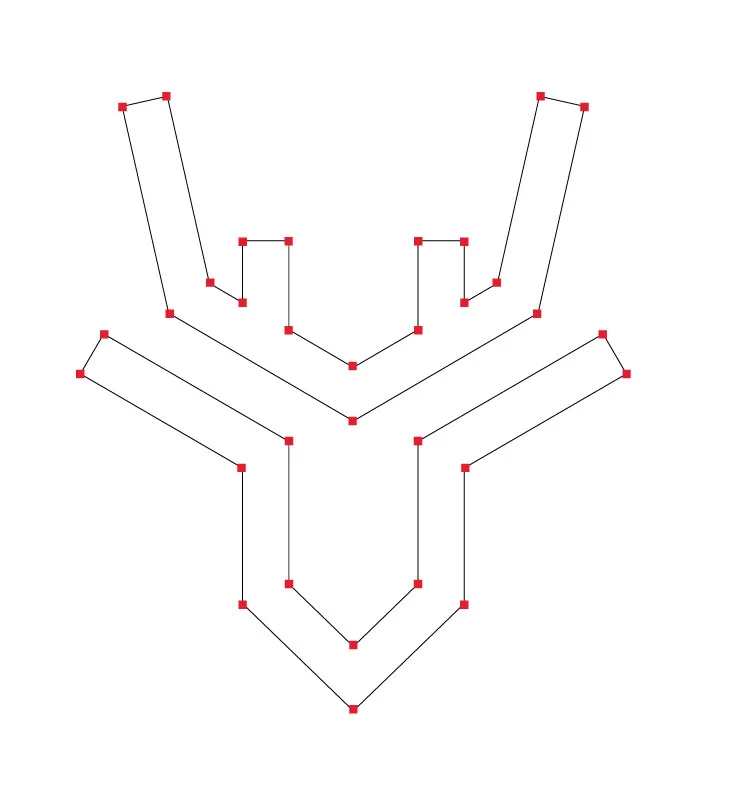
Every logo file format is either vector or raster. A vector file stores shapes as maths, so it can scale to a business card or a billboard with no loss of quality. A raster file stores pixels, so it looks sharp only at the size it was made. Your master logo should always be vector. Raster files are exports made from it for specific uses. For a deeper comparison, read our guide on vector vs raster logos.
Hunter Properties: a vector logo is built from points and curves, so it scales without losing quality.
The main logo file formats and when to use them
AI (Adobe Illustrator). The master file. It is a vector file that your designer or a future designer can edit. Keep it safe, and send it only to people who need to edit the logo.
EPS. An older vector format that many print vendors and sign makers still ask for. Use it when a printer requests a vector file and does not accept SVG.
SVG. A vector format made for the web. It stays sharp on any screen, loads quickly, and works well on websites and apps. Scalable Vector Graphics are the standard choice for web logos.
PDF. A flexible format that can hold vector artwork. It is useful for sharing a logo with printers, partners and clients because almost everyone can open it.
PNG. A raster format with a transparent background, so the logo can sit on a coloured section or a photo. Use it for slides, documents and web images when SVG is not an option.
JPG. A raster format with no transparency, so the logo always has a background. It suits simple uses such as email or a quick share, but PNG is usually the better choice.
Signs, uniforms and embroidery: vector files, plus any one-colour versions.
Presentations and documents: PNG with a transparent background.
Email signature: a small PNG.
Hunter Properties: the same logo exported as an app icon and as a header logo.
Which design software opens each logo format?
Not every image file opens in every program, so it helps to know what you can do with each one. An AI file is the editable master and opens in Adobe Illustrator. An EPS file opens in most professional design software and is the format many print vendors still ask for. An SVG opens in Illustrator, Figma, Inkscape and every web browser, which is why it is the usual choice for websites.
You do not need design software to check what you received. Drag the SVG into a browser tab to preview the vector logo, and open PNG and JPG files in any photo viewer. A PDF opens on almost every device, so it is handy for sharing with printers and clients.
Using your logo as a profile picture
A profile picture is small and usually cropped to a circle or square, so a wide horizontal logo often becomes unreadable. Use the icon-only version exported as a square PNG with some empty space around the mark. Social platforms compress uploads, so start from a clean PNG rather than a small JPG. Our guide on the icon version of your logo explains when to use it.
The short version: keep the AI or EPS as your master, use SVG online, PNG for everyday uploads and PDF for sharing.
What a complete logo package includes
A professional logo package usually includes more than one file. Look for:
Vector files: AI, EPS, SVG and PDF.
Raster files: PNG with a transparent background, and JPG.
Colour versions: full colour, one colour, black and white.
Layout versions: horizontal, stacked and icon only.
Colour values for screen and print, and basic usage rules.
If your package is missing the vector files, ask for them before the project ends. Check the full list with our checklist before launching a new logo.
Common mistakes with logo file formats
Using a JPG on a coloured background. You get a white box around the logo.
Stretching a small PNG. It turns blurry. Use the vector file or a larger export.
Screenshotting the logo from a website. The quality is low and the colours may shift.
Sending the master AI file to everyone. Share exports, and keep the master safe.
Which logo file format is best? The vector master (AI, EPS, SVG or PDF) is best because it scales to any size. Use PNG or JPG exports for specific needs.
Can I use a PNG for printing? Only if it is very large. For print, ask for a vector PDF or EPS.
What is an SVG logo used for? SVG is mainly for websites and apps, where it stays sharp on every screen.
Do I need all the logo file formats? Not every one, but you should have at least one vector file, a transparent PNG and a PDF.
Next step
Need a logo with the full set of files? Browse the logo shop for exclusive readymade marks, or start a project for a custom identity. You can also email hello@logofarmers.com with your question.